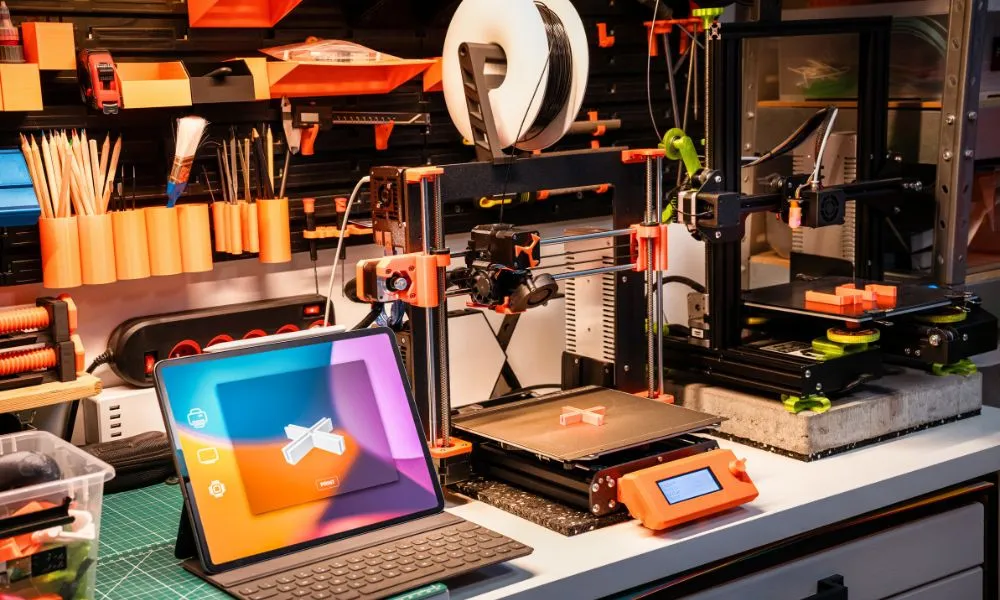
Imagine having a special spot in your home where your ideas can come to life layer by layer. Transforming a piece of your home into a 3D printing hobby room is like putting a world of creativity into the palm of your hand, streamlining your dreams and turning them into reality. A dedicated work area can make the entire printing experience more enjoyable, whether you’re printing functional tools, artistic masterpieces, or experimental prototypes.
The good news? Setting up such a space is easier than you might think, and you don’t need a massive budget or a lot of square footage to get started. This guide will show you how to set up a 3D printing workspace at home and turn it into a safe hub of innovation and excitement!
Choose the Right Space
The first step in creating your 3D printing workspace is selecting an ideal location. Your studio should be a space with enough room to comfortably fit your printer, all its accessories, and any additional tools you may need. Avoid cramped corners or high-traffic areas, as they could expose your printer to accidental bumps or vibrations, which can disrupt print quality.
If possible, choose a quiet and separate space away from your main living areas, as 3D printers often produce noticeable noise during operation. Additionally, consider a space that allows future expansion for more equipment or additional printers as your needs grow if you want to take your hobby to the next level.
Ensure Adequate Ventilation
During the printing process, many filament types release fumes, and while some may seem harmless, others—such as those from ABS or resin—can pose health risks if inhaled over time. Therefore, set up your workspace near an open window or install a fan to improve air circulation to ensure your safety.
For added protection, invest in an air purifier with filters designed to remove fine particles and fumes. Adding an air purifier is especially important if you’re working with materials that emit stronger odors or chemical compounds.
Set Up a Sturdy Work Surface
Your 3D printer requires a stable, sturdy surface to function properly. A wobbly or uneven table can lead to poor print quality, misalignment, or even damage to your printer over time. Choose a solid workbench, desk, or table that can comfortably support the weight of your printer and absorb vibrations during operation.
Additionally, make sure there’s enough space for your tools, filament spools, and other accessories. Having an organized and spacious work surface ensures smoother prints, reduces clutter, and minimizes the risk of accidental damage to your equipment. If possible, consider using an anti-vibration pad under your printer to further improve stability.
Organize Tools and Accessories
An efficient 3D printing workspace depends on proper organization. From scrapers and pliers to resins and filaments, storing your tools and materials neatly will save you time, reduce frustration, and streamline your workflow. Use bins, wall hooks, or pegboards to keep everything within reach but out of the way.
Clearly label your supplies to make locating the right filament or tool quick and easy. Consider grouping items by function or frequency of use to further enhance efficiency. You’ll spend less time searching and more time creating when you have a well-organized space.
Provide Sufficient Lighting
Good lighting is essential for a productive 3D printing workspace. Ensure your area is well-lit with a mix of overhead lighting and task lighting to clearly see your prints, tools, and workspace.
Adjustable desk lamps, LED light strips, or magnified lights can be especially helpful for illuminating specific areas where precision is needed, such as fine-tuning your printer or inspecting small details on your models. Adequate lighting improves accuracy and reduces eye strain during long work sessions.
Create a Filament Storage System
Proper filament storage is crucial for maintaining material quality and ensuring successful prints. Filament can absorb moisture from the air, which can lead to brittle prints or reduced performance. Store your filament in airtight containers with silica gel packets to keep it dry and free from humidity.
For added convenience, consider wall-mounted spool holders or stackable bins that save space while keeping your materials organized. Label your filaments by type, color, and purpose to make it easy to find the right material for each project.
Prioritize Safety
Safety should be a top priority in any 3D printing setup. Keep a fire extinguisher nearby, especially if you’re working with high-temperature printers or electrical components. Make sure your workspace is well-ventilated to prevent fume buildup and avoid placing the printer near flammable materials.
Secure all electrical connections and regularly inspect your equipment for any wear or damage. Maintaining a clutter-free workspace also reduces the risk of accidents, such as tripping over cables or knocking over tools.
Establish a Cleaning Routine
A clean workspace is a productive workspace, and regular maintenance is key to keeping your 3D printer in top condition. After each print, remove debris from the print bed and clean your printer’s nozzles to prevent clogs or filament buildup.
Wipe down surfaces, tools, and accessories to keep them free from dust and residue. Periodically check and tighten any loose screws or components on your printer to ensure smooth operation.
Install Noise Reduction
3D printers can be noisy, which may disrupt your focus, especially in shared or open spaces. Consider placing your printer on a sound-dampening pad or inside an enclosure designed to reduce noise levels. Soundproofing panels on nearby walls can also help absorb sound and create a quieter environment.
Noise reduction makes your workspace more comfortable and contributes to a more pleasant experience for anyone sharing the space with you. Additionally, printer enclosures can maintain a stable ambient temperature, which can improve print quality.
Stay Flexible for Future Improvements
Finally, keep in mind that your 3D printing workspace should evolve with your skills and needs. As you grow more experienced, you may want to add equipment, upgrade tools, or experiment with new techniques.
You can make future improvements easily without needing to completely overhaul your workspace when you design a flexible and adaptable setup from the start. Planning for growth ensures your creative journey remains smooth and enjoyable. By following these tips, you’ll be well on your way to setting up a 3D printing workspace at home that’s functional and inspiring, turning your creative visions into tangible realities!